This is Part 1 of a 3-part series: “GitOps for Homeservers”
- Part 1: My Homeservers, Ansible, and the Pain Points (You are here)
- Part 2: Searching for the Right Tool — Komodo, Dockhand, and Beyond
- Part 3: ComposeFlux — A Lightweight GitOps Tool for Docker Compose
Also read: How I Manage My Homeservers with GitOps and Docker Compose on Medium.
Introduction
I have been managing 2 homeservers and 5 virtual machines in the cloud for almost 2 years. As my enthusiasm grows to self-host software — both for fun and actual use — my docker-compose files and stacks keep growing too. Deploying and managing them became painful over time.
The real frustration kicks in when you have multiple servers and want to use the same app’s docker-compose file (e.g. Traefik reverse proxy) across them. You fix a configuration issue for Traefik on one server and then have to replicate the same fix on every other server.
Through these 2 years, I kept improving my setup and eventually decided to create my own tool called ComposeFlux. In this post, I’ll walk through my server setup, the Ansible-based deployment workflow I used, and the problems that pushed me to look for something better.
My Homeservers and Cloud VMs
First, let me walk through my current server setup — what they do and how it all started.
It was 3 years back when I bought a Raspberry Pi 4 with a case for around 140 Euros. I thought I’d do cool “science projects”, but in reality I didn’t have time because of work and lost interest. I almost sold my Raspberry Pi, but then I saw YouTube videos from Jeff Geerling, specifically Your ISP is lying! Monitor your Internet with a Pi. That got me started — tinkering and monitoring my internet speed. As my day job is SRE/DevOps, I naturally got interested in self-hosting apps and managing them properly.
Homeservers
At the moment, I have 2 homeservers at home connected to the router via LAN:
- Raspberry Pi 4 — Later I bought a “Geekworm NASPi” case (recently I created a tool gpio-pwm-fanctl in Go to manage fan speed) and installed 2 HDDs (1TB and 500GB)
- Old Lenovo laptop (headless) with 1TB SSD
Here are the apps I currently run:
| App | Purpose | Note |
|---|---|---|
| Traefik | Reverse proxy for apps | Traefik HTTPS Config with DuckDNS for Local Homeserver |
| Homer | A simple and lightweight dashboard for all my apps | |
| Jellyfin | Local media streaming | |
| Prometheus & Grafana | Monitoring and visualization | Along with node-exporter, speedtest-exporter, blackbox-exporter. I have plans to replace with VictoriaMetrics and Fluent Bit to simplify and make it lightweight |
| Qbittorrent with Wireguard VPN | Torrent downloads | Wireguard VPN and BitTorrent on Docker Swarm |
| Filebrowser | Browse files and folders on hard drives | |
| MeTube | Download YouTube videos | |
| Immich | Store all my photos and videos | Recently moved away from Google Photos completely |
| GoCron | Schedule backups for Immich | I use Kopia by the way |
| Squoosh | Image compression | I ran into situations where online applications required compressed images for uploads. I was uncomfortable using random online websites for this, so I decided to self-host. It’s old and unmaintained, but good enough for now |
| OmniTools | Useful utils including PDF tools | |
| IT Tools | Handy tools for developers | |
| FreshRSS | RSS feed from Hacker News, etc. | |
| n8n | Automation | Wanted to set up some automation with AI, but haven’t started yet |
| Actual Budget | Track my expenditure | Just deployed, not yet started using it |
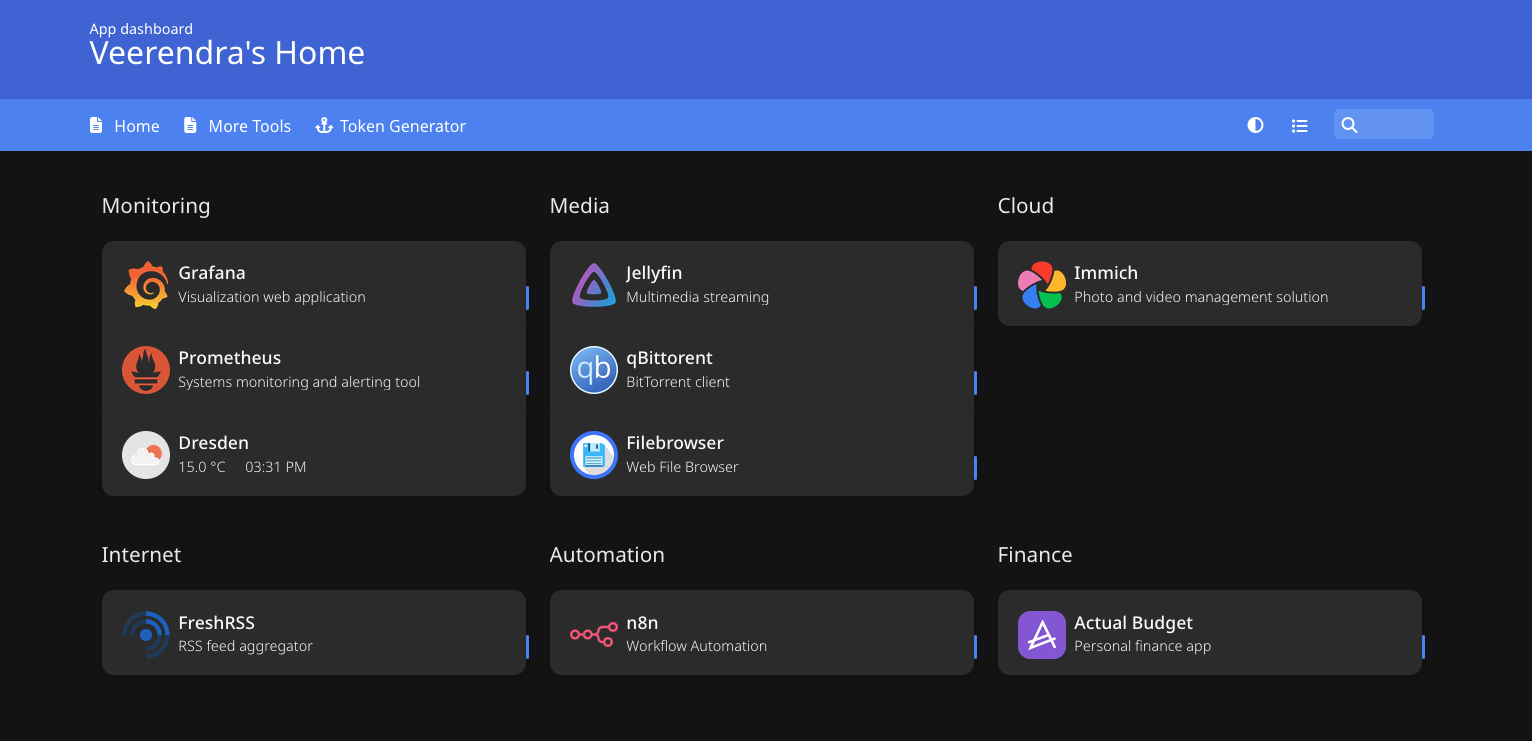
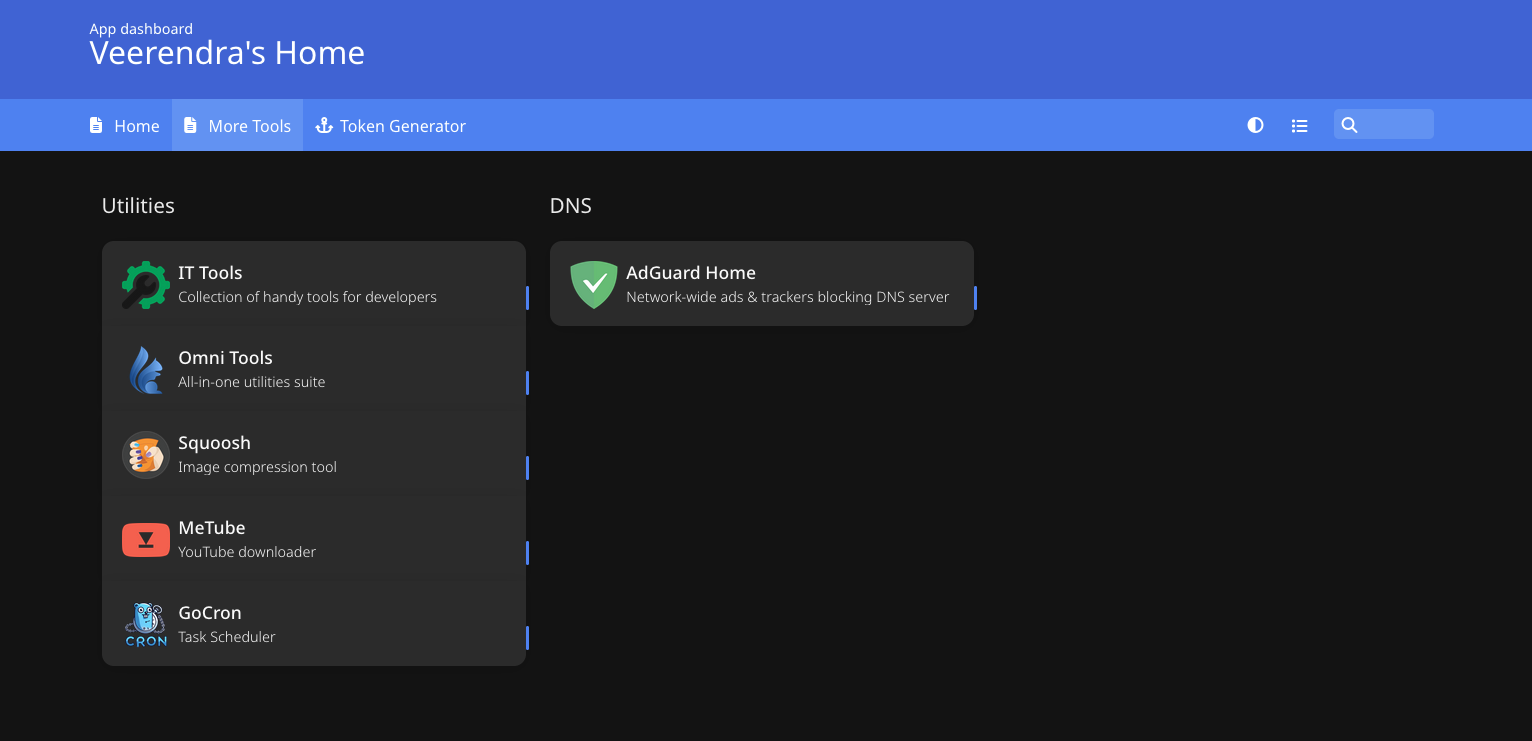
And here is my homepage dashboard:
Virtual Machines on Cloud
I use “Oracle Cloud Always Free Tier” to run tiny VMs in 3 regions (Amsterdam, Frankfurt, and Hyderabad) for VPN servers.
- Check out my Terraform module: oracle-cloud-terraform for provisioning VMs on Oracle Cloud
- Read How to Setup WireGuard VPN Server with Traefik and Authelia for more details, and check out wireguard-traefik-authelia
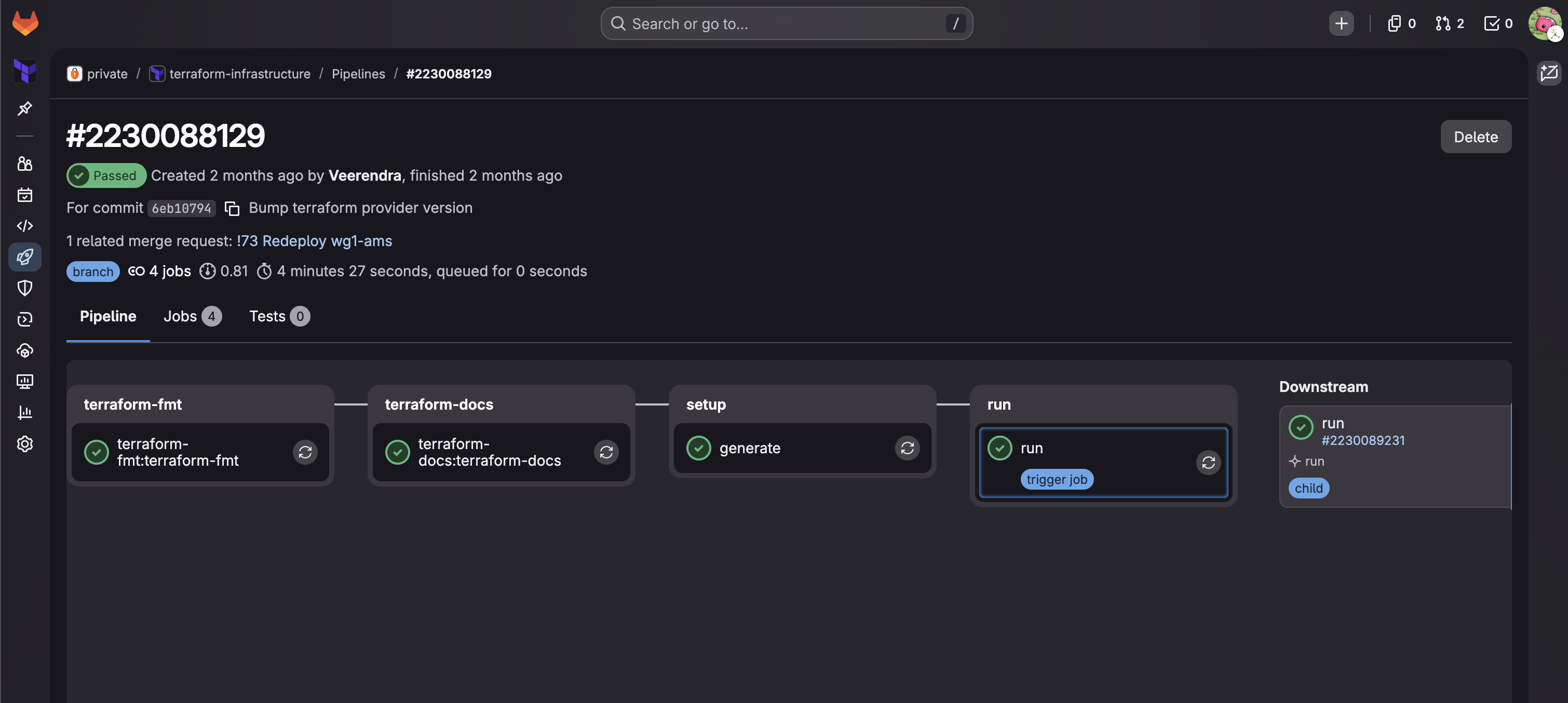
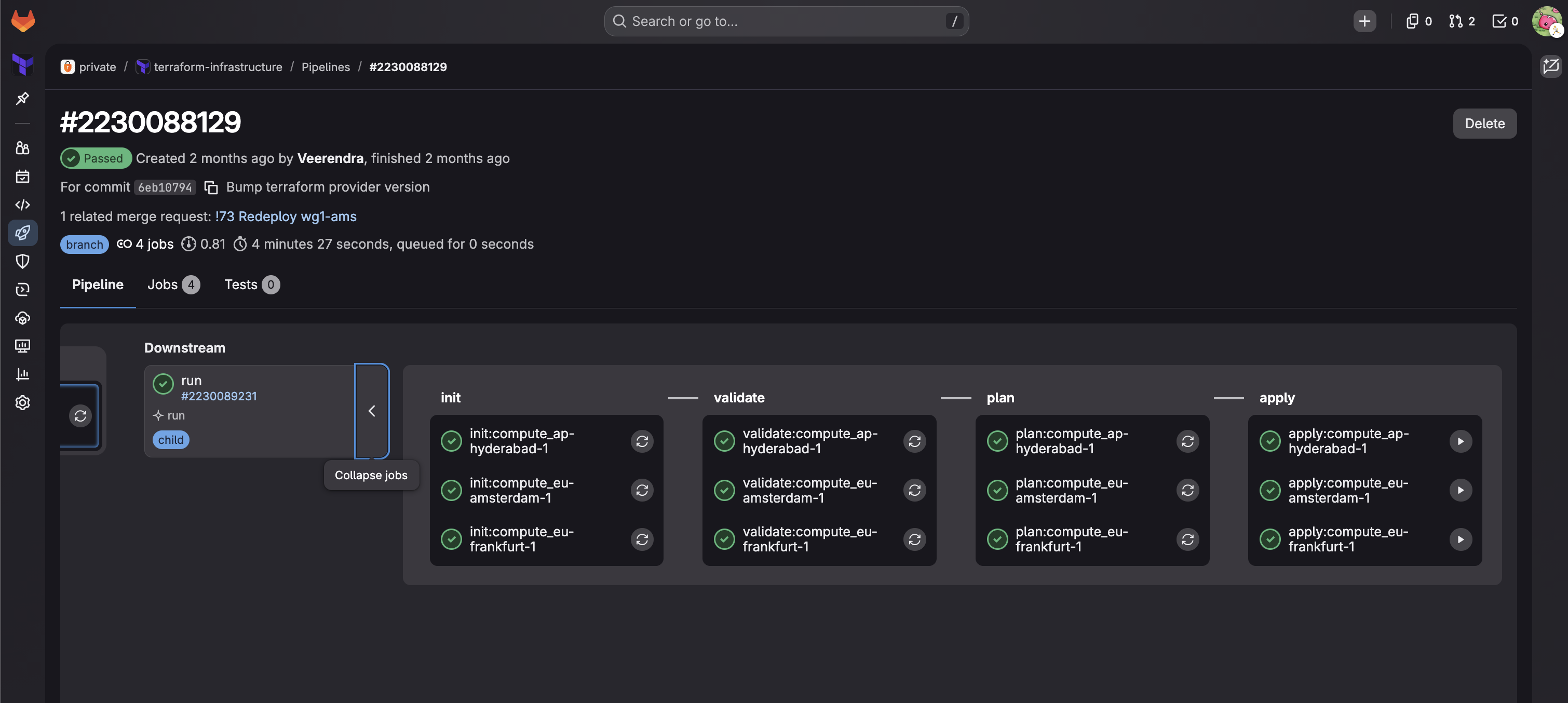
I use Terraform to provision VMs on Oracle Cloud in a private repository on GitLab, because GitLab provides Terraform state management. With a CI/CD setup, I can deploy VMs in different regions.
A typical CI job looks like this:
And downstream jobs:
If you want to know more details on this GitLab CI setup for managing Terraform, drop a comment below.
Custom Ansible Inventory Builder Script
Once VMs are created, I use Ansible to configure them (more on Ansible in the next sections). I have a Python script that connects to GitLab, parses the Terraform state, fetches VM IPs and SSH keys, and generates the Ansible inventory automatically:
export GITLAB_TOKEN=[REDACTED]

./scripts/build-oci-inventory.py
2026-03-22 14:57:22.548 | INFO     | __main__:get_tfstates:48 - Fetch terrafom state 'compute_eu-frankfurt-1'
2026-03-22 14:57:23.481 | INFO     | __main__:get_tfstates:48 - Fetch terrafom state 'compute_ap-hyderabad-1'
2026-03-22 14:57:24.531 | INFO     | __main__:get_tfstates:48 - Fetch terrafom state 'compute_eu-amsterdam-1'
2026-03-22 14:57:25.523 | INFO     | __main__:write_private_keys:114 - Save pem file in /Users/veerendra/.ssh/dev-fra.pem
2026-03-22 14:57:25.525 | INFO     | __main__:write_private_keys:114 - Save pem file in /Users/veerendra/.ssh/wg1-hyd.pem
2026-03-22 14:57:25.526 | INFO     | __main__:write_private_keys:114 - Save pem file in /Users/veerendra/.ssh/wg2-hyd.pem
2026-03-22 14:57:25.527 | INFO     | __main__:write_private_keys:114 - Save pem file in /Users/veerendra/.ssh/wg1-ams.pem
2026-03-22 14:57:25.528 | INFO     | __main__:setup_inventory_dirs:130 - Setup inventory directories
2026-03-22 14:57:25.528 | INFO     | __main__:main:209 - Generate inventory file './inventories/oci-generated-inventory.yml'
2026-03-22 14:57:25.536 | INFO     | __main__:main:215 - Generate ssh config file '/Users/veerendra/.ssh/config.d/ansible_generated'
2026-03-22 14:57:25.539 | INFO     | __main__:add_include_path:185 - Include line already present in /Users/veerendra/.ssh/config

cat inventories/oci-generated-inventory.yml
---
wireguard:
  hosts:
    wg1-hyd:
      ansible_ssh_host: [REDACTED]
      ansible_ssh_private_key_file: ~/.ssh/wg1-hyd.pem
      ansible_ssh_user: [REDACTED]
      ansible_ssh_common_args: "-o StrictHostKeyChecking=no"
...
By the way, I’m in the process of moving this repo to GitHub with a Terraform Cloud free account to manage the Terraform state.
My Previous Deployment Setup
Docker Compose
I use Docker Compose to deploy apps. I previously used Docker Swarm but moved to Docker Compose because I had to pin stateful apps to specific servers for volume mounts, and Docker Compose is simpler. If you want to know more about the previous Docker Swarm setup, check the raspberrypi-homeserver repo.
As I mentioned in the intro, there are situations where I need the same app (e.g. Traefik) across multiple servers. Copy-pasting the same config — traefik labels and its configuration — in multiple places was annoying. I thought, wouldn’t it be great to keep the repeated config in one location and reference it wherever needed? Fix or update in one place, done everywhere.
For this, I initially created a simple Python tool called “Kompozit”, but then I discovered the extend and include feature in Docker Compose. I ended up using that instead.
Base
At the root level, the repo has apps and servers folders. The apps folder acts as a “base” — a collection of
reusable docker compose files:
tree -L 1 .
.
├── apps
├── README.md
└── servers
The apps/ folder:
tree -L 2 apps/
apps/
├── actualbudget
│   └── compose.yml
├── adminer
│   └── compose.yml
├── authelia
│   ├── compose.config.yml
│   ├── compose.yml
│   └── README.md
├── cloudflared
│   └── compose.yml
├── dockdns
│   ├── compose.config.yml
│   └── compose.yml
...
I also use Docker Compose Configs to manage configuration for apps. I’ll discuss later how this becomes useful with ComposeFlux for managing deployments.
Overlay
The servers/ folder contains a dedicated folder for each server:
tree -L 1 servers/
servers/
├── common
├── dev-fra
├── env.sh
├── helium
├── hydrogen
├── proxy-ams
...
Each server folder:
tree -L 2 servers/hydrogen/
servers/hydrogen/
├── actualbudget
│   ├── compose.override.yml
│   ├── compose.production.yml
│   └── compose.yml
├── filebrowser
│   ├── compose.override.yml
│   ├── compose.production.yml
│   └── compose.yml
├── freshrss
│   ├── compose.override.yml
│   ├── compose.production.yml
│   └── compose.yml
...
The compose file in each server’s app folder “includes” the actual docker compose file from the base, using a relative path:
cat servers/hydrogen/homer/compose.yml
---
include:
  - compose.config.yml
  - ../../../apps/homer/compose.yml
The compose.production.yml is the final, fully-resolved docker compose file generated with docker compose config.
This flattened file is then copied to the server and used to run docker compose up via Ansible.
Ansible
I used Ansible to manage configurations for both VMs and homeservers. Here’s the old Ansible repository structure:
tree . -L 1
.
├── 00-prepare-dev-setup.yml
├── 01-prepare-lan-servers.yml
├── 02-install-docker-only.yml
├── 03-dri-permissions.yml
├── 09-update-and-reboot.yml
├── 10-deploy-apps.yml
├── 11-get-authelia-opt.yml
├── 20-basic-security-setup.yaml
├── 21-crowdsec.yml
├── 30-duckdns-update.yml
├── 31-cloudflare-dns-update.yml
├── 50-grafana-cloud-monitoring.yml
├── ansible.cfg
...
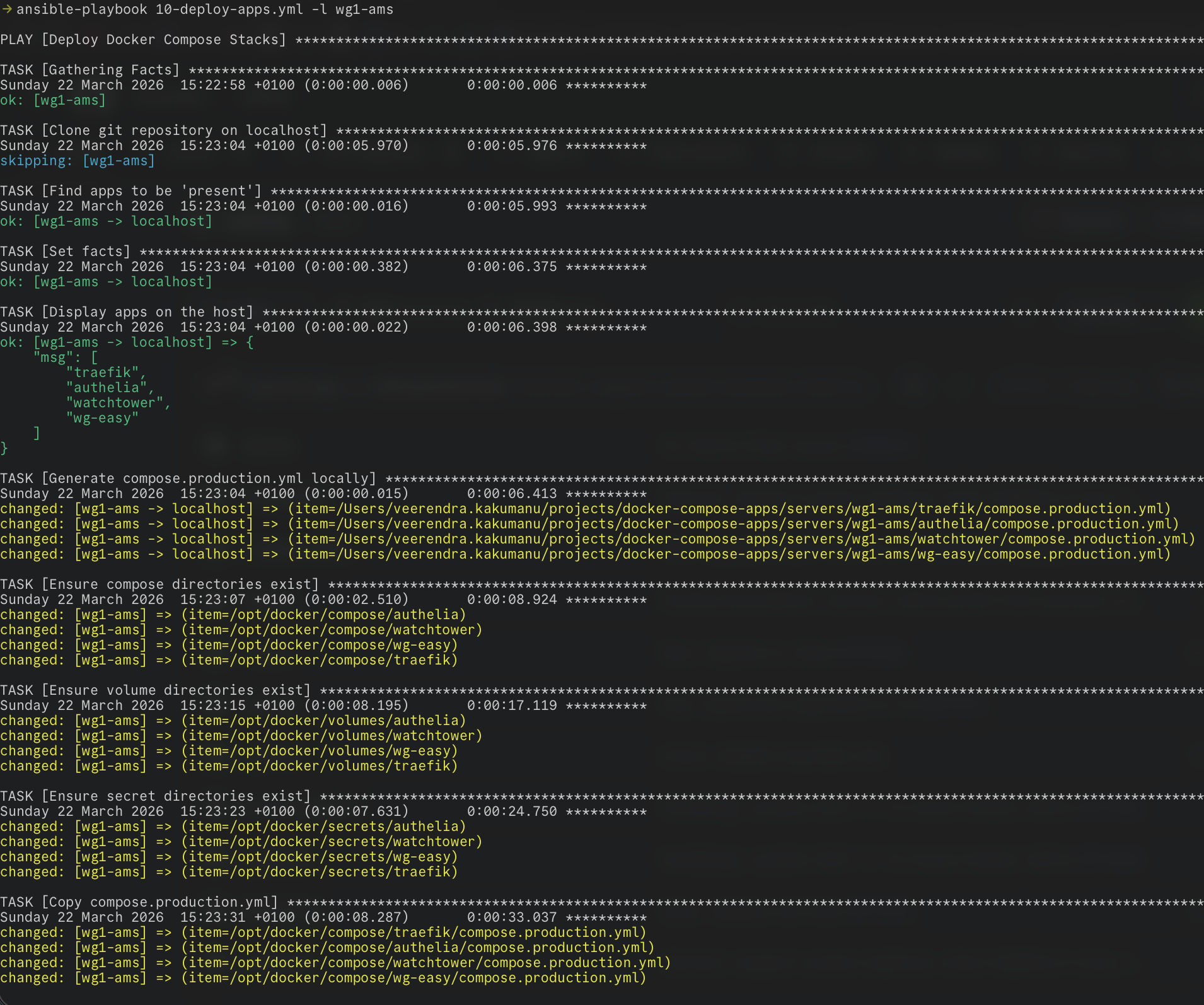
The playbook 10-deploy-apps.yml was the main
one I used for deploying docker compose apps. It does the following:
- Clones the git repo containing docker compose files
- Sets environmental variables (and secrets) in Ansible facts to export while bringing up the docker compose stack
- Generates the full, resolved
compose.production.ymllocally - Creates necessary directories on the target server
- Copies the
compose.production.ymlto the server - Brings up the docker compose stack
I kept all env vars in host_vars and group_vars:
# Host vars
tree -L 2 host_vars/
host_vars/
├── dev-fra
│   ├── vars.yml
│   └── vault.yml # <--- ansible vault file to keep secrets
├── helium
│   ├── vars.yml
│   └── vault.yml
...

# Group vars
tree -L 2 group_vars/
group_vars/
├── all
│   ├── datadog_agent.yml
│   ├── grafana_agent_static.yml
│   ├── vars.yml
│   └── vault.yml
├── dev
│   └── vars.yml
├── home
│   └── vars.yml
The playbook in action:
The Problems
When I created the 10-deploy-apps.yml playbook, it was supposed to be temporary — a stopgap while I searched for a
proper GitOps tool. But as things go, I kept using and improving it. Over time, the pain points became clear:
- Slow deployments — Deploying apps with the playbook was not instantaneous. Prerequisite tasks had to run in sequence every time
- No selective deployment — Even if I only wanted to deploy one app, the playbook had to go through all of them
- Not true GitOps — If I wanted to deploy or redeploy any app, I had to make changes in the docker compose repo and then manually run the playbook
- Manual trigger every time — There was no automation; every deployment required me to run the playbook
- “Temporary” that became permanent — This playbook was never meant to last, yet here it was, still running the show
These problems pushed me to look for proper alternatives, which I’ll cover in Part 2.
Next up: Part 2: Searching for the Right Tool — Komodo, Dockhand, and Beyond