Introduction
As you might know, I manage two home servers for various self-hosted services. I keep everything organized in a GitOps way using ComposeFlux—a tool I built to handle Docker Compose stacks when I got tired of manual updates. (You can read about that journey in GitOps for Homeservers (Part 1)).
Recently, I was catching up with a colleague at the office. We were talking about self-hosting, and I mentioned that I run Immich to completely replace Google Photos. He was impressed but then asked the one question I couldn’t answer: “How much are you actually paying for the electricity to run those servers 24/7?”
I brushed it off, saying “Not much, I think,” since one is just a Raspberry Pi 4 and the other is a headless old Lenovo laptop. But that “I think” started bugging me. I realized I had no idea what the actual footprint of my “cheap” home lab was.
The Hunt for Data
My curiosity took over. Initially, I looked into software-based tools like powertop. While it’s great for tuning, it didn’t give me the accurate, live, aggregate power usage I wanted.
Next, I went to Amazon to find a cheap power plug with a display. My “clever” plan was to buy one, track the usage for a few days to satisfy my curiosity, and then return it. I ordered a basic Electricity Meter for Socket. I plugged my server power strip into it and saw that it usually sits around 20 Watts. However, when Immich starts its Facial Recognition or video transcoding jobs, that number jumps to 40 Watts.
It was a good start, but I’m a DevOps engineer—looking at a tiny LCD screen under my desk isn’t enough. I wanted those numbers in my Prometheus/Grafana stack.
Finding the Right Hardware: Shelly
I needed a “smart” plug that didn’t just have a pretty app, but a documented API. I was skeptical because many “smart” devices are locked into proprietary clouds with no local access. I don’t like workarounds or fragile hacks.
I asked Gemini for recommendations and discovered Shelly. Their devices are famous in the DIY community for having full API support and excellent documentation. I sent the basic meter back and ordered a Shelly Plug M Gen3 for about 13 Euros. Best decision ever.
Shelly Device Exporter
While Shelly has a cloud app, I prefer keeping my data local. You can disable the cloud access entirely on these devices, which is a huge plus for privacy. However, I still needed a way to get the data into Prometheus.
I found a few existing exporters, but they didn’t quite fit. One was buggy, and another didn’t include the “cost” logic I wanted. So, I did what any developer would do: I wrote my own.
veerendra2/shelly_device_exporter
The Shelly RPC API is fantastic. A simple curl gives you everything you need:
curl --digest -u admin:"REDACTED" 'http://192.168.0.10/rpc/Shelly.GetStatus' | jq .
{
  "switch:0": {
    "apower": 15.4,
    "voltage": 237.6,
    "freq": 50.0,
    "current": 0.124,
    "aenergy": {
      "total": 10358.259,
      ...
    }
  },
  "sys": {
    "uptime": 2241869,
    "ram_free": 105616,
    ...
  }
}
I used the API docs to build out the Go structs and created an exporter that not only tracks power but also calculates the financial cost in real-time.
Dashboard & Configuration
The dashboard provides a clear breakdown of current power usage, voltage, and the accumulating cost.
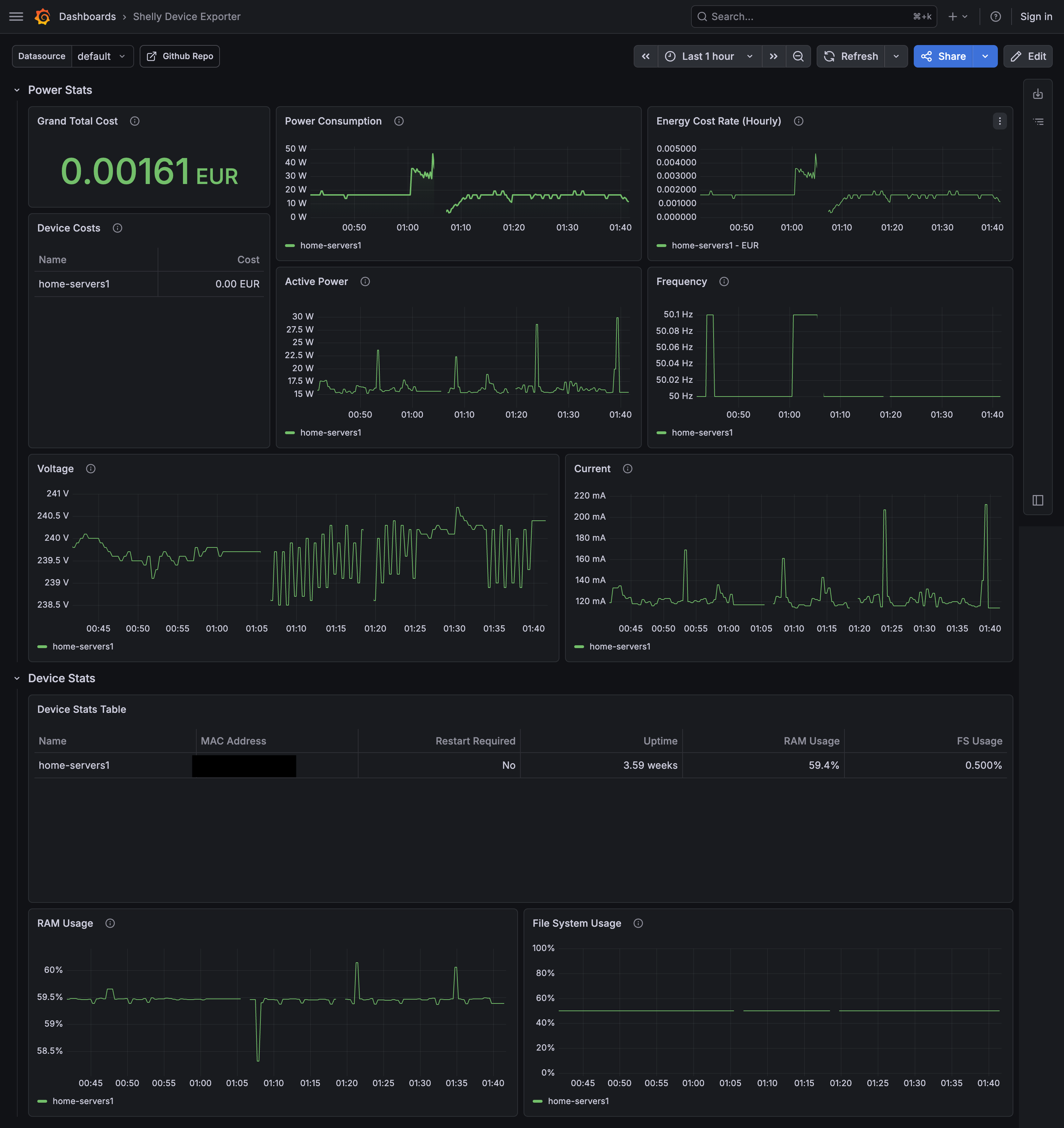
The configuration is straightforward. Since Shelly devices are affordable, I can add more plugs for other appliances later and manage them all through one config:
price_per_kwh: 0.3362
currency: "EUR"

devices:
  - name: "home-servers"
    address: "http://192.168.0.6"
    username: "admin"
    password: '{{ env "SHELLY_DEVICE1_PASSWORD" }}'
The price_per_kwh comes straight from my electricity contract. The exporter calculates the shelly_device_aenergy_cost_total metric, making it incredibly easy to visualize exactly how many Euros my home lab is “eating” each month.
To ensure Prometheus scrapes remain blazing fast as I add more plugs, the exporter handles multiple devices concurrently. Under the hood, it spins up Go routines—capped at a pool of 4 parallel workers—to fetch status data from all configured Shelly devices at once, rather than polling them slowly one by one.
Conclusion
Turning a casual office question into a full monitoring project might seem like overkill, but the visibility is worth it. I no longer have to guess about the “hidden costs” of my self-hosting hobby. With the Shelly Plug and a custom exporter, I have a data-driven view of my power consumption—proving that while my home lab isn’t free, the peace of mind that comes from local data and GitOps-managed servers is priceless.
Check out the repo to set up your own: github.com/veerendra2/shelly_device_exporter