Introduction
ComposeFlux is a GitOps tool for managing Docker Compose stacks on home servers. It watches a Git repository and automatically deploys stacks when changes are detected.
Goals
- Manage a few Docker Compose stacks on home servers
- No complex orchestration, clustering, or remote agents
- Local operation only - each server runs its own instance
- Just Git + Docker Compose + Age Encrypted Secrets (or Secrets Manager)
How Sync Works
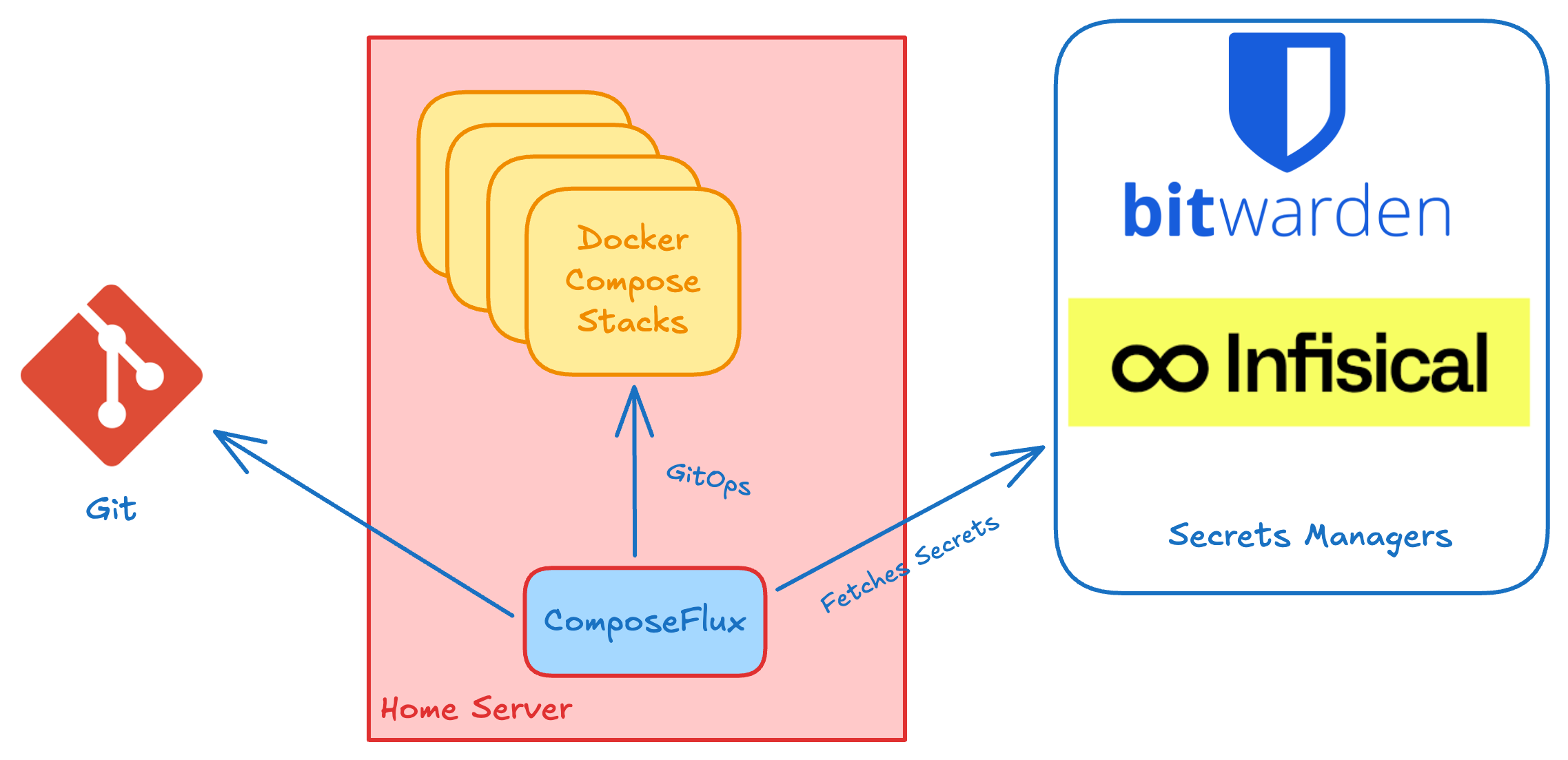
ComposeFlux runs a Git sync loop in daemon mode (run command). It performs an initial sync at startup, then checks the
remote Git repository for changes and syncs again when updates are detected.
- Pulls latest commits and tracks changed file paths
- Loads shared secrets (remote provider and root
*.agefiles) - Loads environment variables from
stack.yml(if present) - Discovers compose stacks (one level deep in
STACK_PATH) - Builds dependency file set for each stack (compose files, include blocks, env files, mounted configs, secrets, build context, stack
*.agefiles) - Deploys stacks that have file updates or are missing from Docker (respects
startup_order) - Prunes stacks deleted from Git
Warning
Git is the source of truth for the managed checkout. Before startup checkout and each Git sync reset, ComposeFlux discards local changes to tracked files and logs a warning listing the affected paths. This includes changes made by applications through writable bind mounts. Unrelated untracked files are preserved; files at paths required by the target Git revision are not protected from replacement. Keep mutable application data outside tracked files.
The deployment summary reports deployed, deploy_failed, load_failed, and skipped counts. skipped means
unchanged or suspended stacks, not loading failures. The summary is logged as a warning if any stack fails to load,
build, or deploy; other stacks continue under the existing reconciliation policy. Pruning is reported separately.
Optionally, a separate cron-scheduled image update check (IMAGE_UPDATE_SCHEDULE) pulls new images and redeploys stacks
when a new image digest is detected. If an image-update job is still running, the next scheduled invocation is skipped.
Shutdown waits for active image-update jobs before closing clients; an unresponsive secrets-provider request can delay
that wait.
Two additional background loops run independently:
- Health reconciliation — checks all managed stacks on
HEALTH_RECONCILE_INTERVAL(disabled by default) and redeploys any that are stopped or have exited/dead containers - Docker resource prune — prunes unused images, volumes, and build cache on
PRUNE_INTERVAL(default: 24h), but only when all managed stacks are healthy (see Periodic Docker Resource Pruning)
Git Diff & Dependency Change Detection
ComposeFlux uses a Git diff and dependency-tree-based approach to decide whether a stack needs redeploying:
- Git Diff Path Matching: ComposeFlux tracks modified, added, or deleted file paths between Git commits.
- Dependency Tree Resolution: Each stack's Compose project resolves all related file dependencies, including:
- Compose files and
includedirectives - Environment files (
env_file) - Age-encrypted secrets (
*.agefiles in stack or included directories) - Mounted configuration files (
configs) and secrets (secrets) - Host bind mounts (
volumes) - Local build context and Dockerfiles (
build) - Base / Overlay Support: Changes in shared base directories (e.g.,
base/app1included byoverlays/prod/app1) are automatically mapped to dependent stacks. - Targeted Redeployment: A stack is redeployed only if any changed file in Git overlaps with its dependency file set, or if the stack is missing from Docker.
Image Update Exclusion
Exclude stacks from automatic image updates by adding the composeflux.image-update.exclude: "true" label to any
service. If any service has this label, the entire stack is skipped.
Example:
services:
  db:
    image: postgres:15
    labels:
      composeflux.image-update.exclude: "true"
Notes: If ANY service has the label, the entire stack is excluded
Stack Configuration
Optional configuration file in the Git repository within the STACK_PATH directory that allows you to:
- Control deployment order (e.g., deploy Traefik first for proxy/certificates)
- Share environment variables across all stacks
The configuration file should be placed at <repo>/<STACK_PATH>/stack.yml.
Directory structure:
your-stacks-repo/
└── stacks/              ← STACK_PATH
    ├── stack.yml        ← Config file here
    ├── traefik/
    │   └── compose.yml
    ├── nextcloud/
    │   └── compose.yml
    └── jellyfin/
        └── compose.yml
Example:
# Only list stacks that need specific order
# Everything else deploys in whatever order
startup_order:
  - traefik # Must match the directory name in STACK_PATH

# Common variables available to all stacks
envs:
  DOMAIN: homeserver.local
  TZ: America/New_York
  ENVIRONMENT: production
With this configuration, Traefik deploys first, then the rest of the stacks deploy in any order.
Important Notes:
- Scoped to
STACK_PATHonly - doesn't affect other directories - Names in
startup_ordermust match directory names exactly - No need to list all stacks - only ones requiring specific order
- Do not set a custom
name:in yourcompose.yml. The Docker Compose project name must match the stack directory name. Projects with mismatched names are rejected before building or deploying; ComposeFlux does not rename them.
A missing stack.yml is allowed. If an existing file is malformed or unreadable, ComposeFlux stops that reconciliation
pass instead of deploying with empty shared variables or startup order. An error returned by the initial sync exits
the daemon; later reconciliation errors are logged and the daemon keeps running.
Multi-Server Setup
ComposeFlux runs locally on each server - there's no central controller or remote agents:
Server 1 (homeserver-1)          Server 2 (homeserver-2)
┌─────────────────────┐          ┌─────────────────────┐
│ ComposeFlux         │          │ ComposeFlux         │
│ → stacks/server-1/  │          │ → stacks/server-2/  │
└─────────────────────┘          └─────────────────────┘
         ↓                                ↓
    ┌────────────────────────────────────────┐
    │   Git Repository (shared)              │
    │   your-stacks-repo/                    │
    │   └── stacks/                          │
    │       ├── server-1/   ← Server 1 stacks│
    │       │   ├── app1/                    │
    │       │   └── app2/                    │
    │       └── server-2/   ← Server 2 stacks│
    │           ├── app3/                    │
    │           └── app4/                    │
    └────────────────────────────────────────┘
Example Configuration:
- Server 1:
STACK_PATH=stacks/server-1 - Server 2:
STACK_PATH=stacks/server-2
Each ComposeFlux instance only manages stacks in its configured directory.
Proactive Stack Health Reconciliation
In addition to Git-triggered syncs, ComposeFlux periodically checks all managed stacks and redeploys any that are unhealthy. This catches stacks that stopped, crashed, or were manually shut down between git ticks — without relying solely on Docker restart policies.
A container is considered healthy if:
- Its state is
running, OR - Its state is
exitedwith exit code 0 and it has thecomposeflux.init: "true"label
Everything else (dead, paused, exited without the init label, non-zero exit) is unhealthy. A stack is unhealthy
if any of its containers are unhealthy.
restarting containers are unhealthy — they are not running. If you want Docker's own restart policy to handle
recovery without ComposeFlux intervening, use the Suspend Label to pause health reconciliation for
that stack.
Init containers: If your stack uses init containers (short-lived containers that run setup tasks and exit), mark them
with the composeflux.init: "true" label so ComposeFlux treats a clean exit (code 0) as healthy:
services:
  migrate:
    image: flyway:latest
    labels:
      composeflux.init: "true"
  app:
    image: myapp:latest
    depends_on:
      migrate:
        condition: service_completed_successfully
Without this label, an exited container (even with exit code 0) is treated as unhealthy and triggers a redeploy.
Recovery action: ComposeFlux calls docker compose up using the existing project config (no git pull). The git
ticker continues to handle source drift independently.
Max attempts: After 3 consecutive deploy failures for a stack, health reconciliation skips that stack and logs a warning. The counter resets on the next successful git sync or successful image update.
Configure the check interval with HEALTH_RECONCILE_INTERVAL (default: disabled). Set to e.g. 5m to enable.
Health Suspend Label
You can pause reconciliation for a specific stack by adding the composeflux.health.suspend: "true" label to any service in
the stack's compose file:
services:
  db:
    image: postgres:15
    labels:
      composeflux.health.suspend: "true"
Commit the change. Once ComposeFlux pulls it, the label in the loaded Git Compose project suspends the stack without redeploying it. To resume reconciliation, remove the label and commit again.
When any active service in the Git Compose project has this label:
- Git deployment skips the stack, including manual force sync
- The health reconciliation loop skips that stack entirely
- Automatic image updates skip the stack entirely
- The Docker resource prune loop aborts and skips pruning for the entire run
Running-container labels do not override the Git configuration. Deleting the stack from Git still requests its removal, even if its old containers carry a suspension label.
This is useful during maintenance operations — for example, labelling a database service as suspended before stopping it
for a backup (docker stop postgres) without triggering an immediate reconcile that would restart it.
Periodic Docker Resource Pruning
When PRUNE_INTERVAL is set, ComposeFlux runs a periodic prune cycle (default: every 24h, configurable via
PRUNE_INTERVAL) to reclaim disk space from unused Docker resources. Set PRUNE_INTERVAL=0 to disable pruning entirely.
What is pruned: dangling (untagged) images, volumes, build cache. Containers and networks are not pruned.
Safety guard: The prune cycle requires every discovered source stack to be present and healthy in Docker.
If a source stack is missing, stopped, degraded, or has composeflux.health.suspend=true in its loaded Git Compose
project, the prune cycle is skipped for that interval and a warning is logged. Failure to load a source project or
its required shared secrets also prevents resource pruning.
Blog Posts
To learn more about the motivation behind ComposeFlux and see it in action:
- GitOps for Homeservers (Part 1) — My Homeservers, Ansible, and the Pain Points
- GitOps for Homeservers (Part 2) — Searching for the Right Tool
- GitOps for Homeservers (Part 3) — ComposeFlux: A Lightweight GitOps Tool
- How I Manage My Homeservers with GitOps and Docker Compose (Medium)
Limitations
- Nested stack discovery (only scans one level deep)
- Multi-server orchestration (no central controller)
- Rolling updates or zero-downtime deployments
- Built-in monitoring or alerting
Stack Discovery is One Level Deep:
stacks/
├── app1/            ← Discovered ✓
│   └── compose.yml
├── app2/            ← Discovered ✓
│   └── compose.yml
└── nested/
    └── app3/        ← NOT discovered ✗
        └── compose.yml
💡 Use a flat structure. For multi-server setups, create separate directories per server.